Key takeaways:
- Microsoft Copilot Studio and Agent 365 do not compete; they represent separate, complementary layers.
- Copilot Studio serves as the creation and interaction environment, while Agent 365 provides cross-platform visibility.
- Agent 365 acts as a universal registry, discovering native Microsoft builds, partner integrations, and unauthorized "shadow" agents.
- Autonomous background agents require dedicated, non-interactive IDs managed via Agent 365.
- Enterprise-grade security is achieved by linking Agent 365 with Microsoft Entra, Purview, and Defender XDR at runtime.
As enterprises move to autonomous agents, understanding the roles of Microsoft Agent 365 versus Copilot is critical for scaling AI architecture.
These tools serve different layers of the enterprise AI ecosystem.
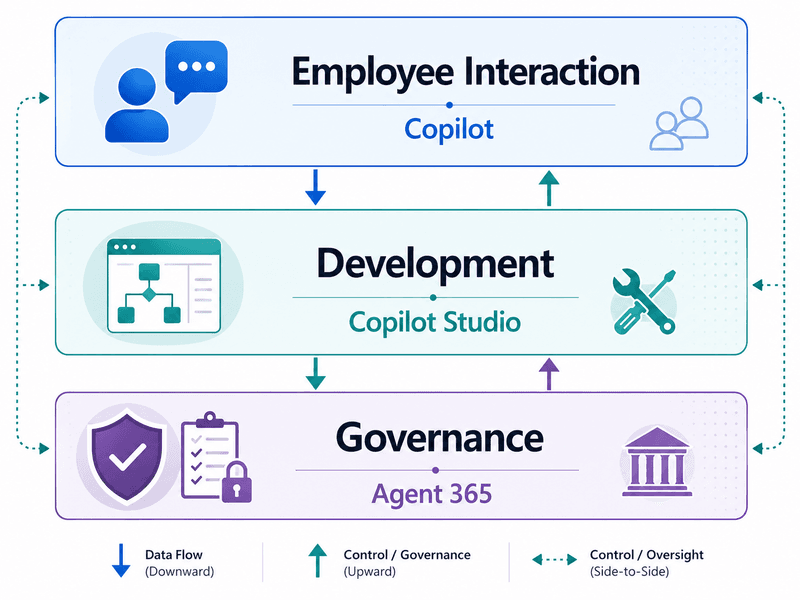
Copilot and Copilot Studio drive productivity, while Agent 365 provides centralized governance and security oversight.
For IT, security, and compliance teams, knowing when and how to deploy Agent 365 is key to safely scaling AI.
You can't use builder tools to solve a governance problem
Microsoft has expanded its enterprise AI stack to address both productivity and governance needs, which includes:Microsoft 365 CopilotCopilot StudioMicrosoft Agent 365Work IQWindows 365 for Agents & MXC SDK
This structural separation ensures that teams do not bypass core security boundaries required by enterprise IT, compliance, and security operations center (SOC) analysts.
How the Microsoft Agent 365 versus Copilot ecosystem components work
When you’re building a secure digital workforce, it’s important to understand the fundamentals of these platforms:
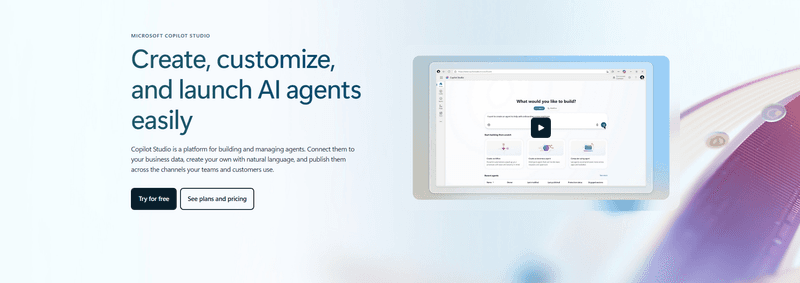
The agentic engine: Microsoft Copilot and Copilot Studio
The creation and consumption landscape within the Microsoft tenant is divided into three tiers:
- Microsoft 365 Copilot: The primary conversational interface for end-users, delivering real-time assistance grounded in the Microsoft Graph
- Agent builder: A natural-language utility operating inside Copilot for constructing basic, scoped question-and-answer agents restricted to a user's existing data permissions
- Microsoft Copilot Studio: A low-code/pro-code Integrated Development Environment (IDE) used to configure complex conversational flows, establish application lifecycle management (ALM) pipelines, and orchestrate connectors to external systems
The administrative control plane: Microsoft Agent 365
Agent 365 acts as a universal registry, automatically finding and tracking all AI agents built with Copilot Studio. Pre-configured partner integrations (e.g., Zendesk, Zendai, Genspark, and Kore.ai) are also included.
It unifies administrative workflows by extending existing security tools (Microsoft Entra, Purview, and Defender) to address the unique runtime behaviors of AI systems.
Moving beyond prompts: Autopilot agents and Work IQ layer
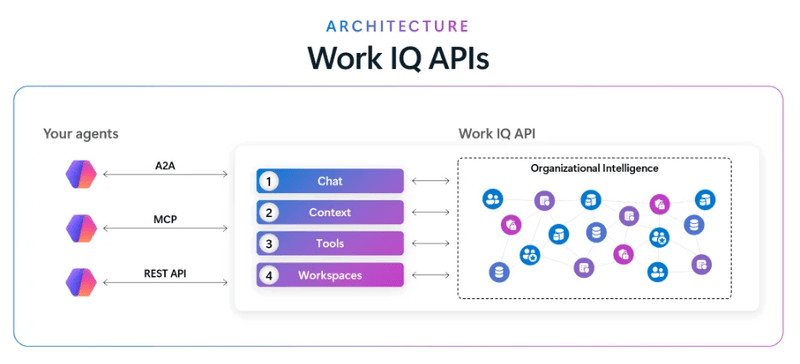
Enterprise AI is evolving toward always-on, autonomous agents (like Microsoft Scout) that run in the background. The Work IQ layer optimizes data retrieval, requiring a one-time service principal registration via Graph Explorer.
Comparing Microsoft Agent 365 and Copilot
Copilot Studio handles design-time creation. But it lacks the real-time threat detection that Agent 365 delivers once agents go live in production.
DimensionCopilot & Copilot StudioAgent 365User End-users, low-code buildersIT/SOCGoalAutomate workflowsCentralize and auditLifecycleBuild & testLive executionReachM365 ecosystemUniversal (M365, AWS, GCP)SecurityDesign DLPReal-time blocksCostIncluded / Credits$15/mo or E7 bundle
Balancing autonomy with absolute control
Successful AI scaling and understanding the critical distinction of Microsoft Agent 365 versus Copilot requires a layered blueprint.
Every employee gets a Copilot assistant. Every core business process gets a specialized Copilot Studio agent. IT uses Agent 365 to keep the entire system visible, compliant, and secure.
You should not abandon Copilot Studio to adopt Agent 365. Instead, Agent 365 must be deployed as a governance layer when an enterprise crosses operational thresholds to ensure a secure digital workforce.
FAQs for Microsoft Agent 365 versus Copilot
How do Copilot Studio and Agent 365 interact during an agent’s lifecycle?
Developers use Copilot Studio to build and test agents. Once published, the agent transitions to Agent 365, which registers it, assigns an Entra identity, and monitors network connections.
What are the administrative cards within the Agent 365 dashboard used for?
Located in the M365 Admin Center, these cards compile security telemetry to highlight active governance gaps (e.g., pending requests, risky agents, orphan builds, and workflow errors).
How does Agent 365 integrate with Microsoft Defender XDR?
Telemetry feeds into Defender's "AI Agents" asset dashboard. At runtime, Defender analyzes prompts and tool calls, instantly blocking high-confidence threats like prompt injection or data exfiltration.
Can security teams run custom forensic audits on active agents?
Yes. Analysts can use Kusto Query Language (KQL) in Advanced Hunting to query active agents across four specialized Defender tables (AIAgentsInfo, CloudAppEvents, AlertInfo, and AlertEvidence).
Disclaimer: This article is AI-assisted content and may contain errors. Platform features, policies, and availability may change. Always verify details with official sources.