Key facts:
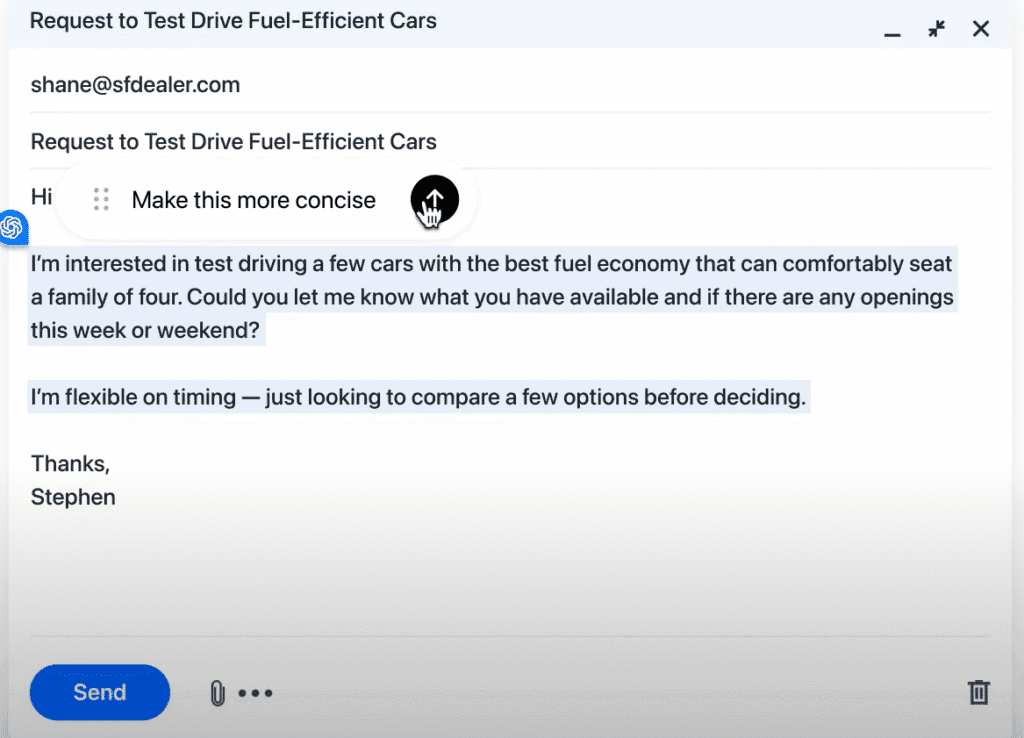
- Inline edits anywhere: Atlas’s “Edit with ChatGPT” lets you rewrite directly inside any text field (e.g., CMS, docs, email). Shortcut: CMD+E. Hover the dot to invoke.
- On-page brief + rewrite: The Ask ChatGPT sidebar opens on any page to summarize research, analyze claims, and handle drafting in the same window.
- Agent-assisted research (preview): Agent Mode can run multi-step tasks (e.g., gather sources, compile stats) with you supervising actions - useful for briefs and fact sheets.
- Safety + permissions: Built-in Security settings and per-site permissions help reduce risk when opening unknown pages during concepting and QA.
- Availability note for workflows: Atlas runs on macOS today; teams should confirm access before standardizing creative processes.
Copywriters still toggle between research tabs and writing tools, despite the innovation of AI browsers like ChatGPT Atlas. It's an AI-native browser that changes how you write copy and build campaigns.
Atlas sits beside every page you visit. You can research a competitor, draft three headline variants, and test messaging angles without switching tabs. Gone are the days of copy-pasting between windows or losing your train of thought.
The AI understands what's on your screen and helps you act on it. If you have a macOS, I highly recommend installing Atlas (as it’s live on the system) and using it to start building content strategies. As for you Windows, iOS, and Android folks, sit tight and study this blog till it’s available!
How Atlas works for copywriters and marketers
Atlas puts AI where you already work: inside the browser. Instead of the long process of:
Exporting research → drafting in another tool → then pasting back,
You write, edit, and strategize, all on the same page.
That compression matters when you're managing three campaigns and a rebrand. Here are 10 ways I have found Atlas useful in my process, and why marketers should switch to it :
1. Write in the page
Highlight copy in your CMS or doc. Hit CMD+E. Ask for “shorter, benefits-first, US spelling.” Atlas rewrites it inline. You apply or cancel. No tab shuffle, no clipboard juggling.
I use this when client drafts run long and I need three tight variants without putting in the effort. It's faster than opening a separate doc and losing context.
2. Research that follows you
Open the Ask ChatGPT sidebar. Say, “Pull claims and CTAs from this page, list sources.” It reads what you're reading and outputs a tidy brief.
Perfect for audit work or when you're reverse-engineering a competitor's funnel.
3. Angle mining
Select a competitor section → Ask ChatGPT about it. Prompt: “Extract hooks, proof, and risk words.” You get a grid of positioning angles in seconds.
Example: I pulled five angles from a fintech homepage and had my creative brief half-done before the strategy call.
4. Agent-assisted legwork
Flip Agent Mode on. Have it open pricing pages, capture stats, and assemble a fact sheet.
5. Source-aware headlines
Prompt: “Ten campaign headlines with a source note per claim.” Atlas keeps links in the thread so ad copy stays defensible.
6. Persona messages from reviews
Ask the sidebar to scan testimonials and forums, then map pains → benefits → outcomes. Paste results straight into your brief.
7. Brand memory, on your terms
Opt in to browser memories when voice rules are final. Atlas recalls phrasing while you control visibility and history.
8. Safer claim language
Use inline edits to add qualifiers, remove absolutes, or insert references with clear deltas.
9. Consistent funnel handoff
Draft a long explainer once, then generate matching ad variants and CTAs for each channel.
10. Ship with oversight
Agent mode runs inside boundaries. Keep it supervised, especially on logged-in sites.
Workflow notes
Confirm access: Atlas is macOS-only today.
Train habits: inline edits (Cmd+E), right-click “Ask ChatGPT about…”, and sidebar prompts.
Use Incognito and per-site visibility for embargoed work.
Final thoughts
Atlas keeps you in flow. You research, write, and edit without switching windows or losing context.
You stay in the work instead of managing the workflow around it.
FAQs about ChatGPT Atlas
Is ChatGPT Atlas free?
Yes, it is free on macOS, with Agent mode in preview for Plus/Pro/Business.
How do I open inline edits?
Highlight text and press CMD+E.
Can the agent act on its own accord?
Only with permission, and you can pause anytime.